Conversions Editor
Overview
The Conversions Editor (CE) allows users to define and manage conversion technologies such as boilers, engines, and turbines—used in resource processing and combustion. Each conversion serves as a mathematical bridge between a fuel input and its resulting environmental outputs.
A conversion is defined by two primary components:
- Associated Resource: The specific input resource the conversion is relevant to (e.g., Natural Gas or Residual Oil).
- Emissions Table: A matrix of emission factors organized by species and year.
Emissions are typically entered as time-series data per functional unit of the input resource (e.g., grams of pollutant per Joule of Natural Gas). In instances where time-series data is unavailable, the default value is used.
The Conversion Editor has two bottom tabs:
- General Information
- Usage Tab
The functionality of the usage tab is explained within the relevant section within the Tab Navigation Section.
General Information Tab
The General Information tab has two sections:
- Top information section
- Emissions table
Top Information Section
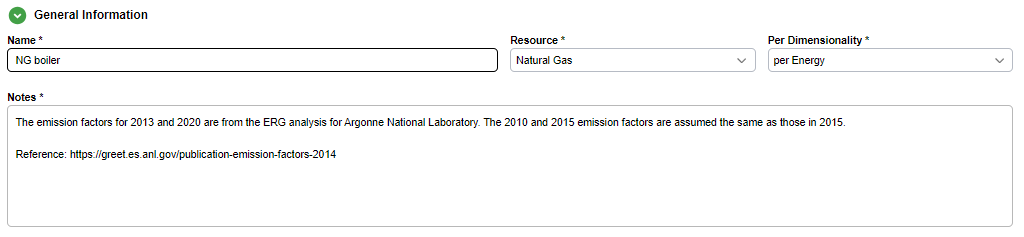
Allows the user to set:
- Name
- Notes
- Resource the conversion is relevant to
- Dimensionality basis to express the emission factors
Important
All conversions must have a resource chosen for them.
Per Dimensionality
Dimensionality awareness is important to ensure data integrity and avoid calculation errors in cases where converting between dimensionalities is not possible.
Emissions Table
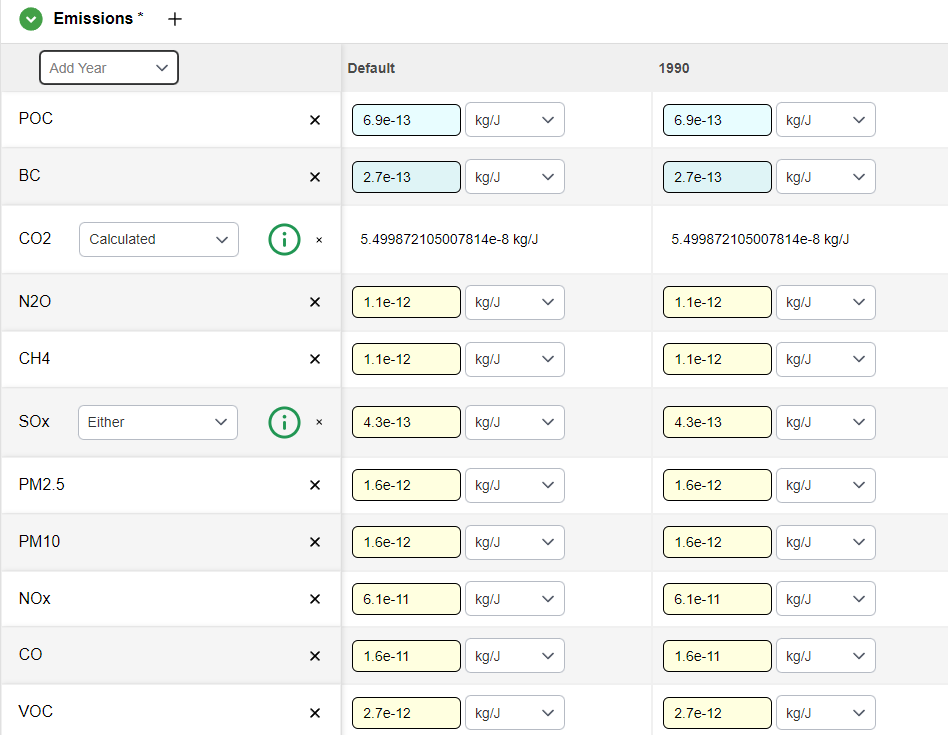
The emissions table serves as the primary data for the conversion. The table consists of:
- Rows: Individual emissions
- Columns: Years
Default Column
Every emissions table has a "default" column, which serves as the data chosen for non-time series emissions.
Adding Data
- New emissions: Click the
+icon visible by hovering over the Emissions subsection title - New years: Choose from the Add Year dropdown on the leftmost column
Data Entry
Most emissions have data entered normally.
Note
Because the emissions table itself holds the time series data, the formula editor does not show the time series table for emissions cells.
Special Emissions: CO2 and SOx
CO2 and SOx emissions can either be:
- Entered manually
- Automatically calculated
- A combination of the two
Choose the method with the dropdown in the leftmost column of the row.
An information icon can be hovered over to explain the calculations.
Calculated Emissions
If an emission is calculated, the calculated value for the emission will be shown, but the cell will not be editable.
Implementation and Balancing
Conversions are applied whenever a resource is combusted, most commonly within the inputs of a stationary process or within transportation modes (e.g., locomotive engines or ocean tankers). While users can manually define factors, the software frequently automates CO2 and SOx calculations. This balancing act utilizes the carbon and sulfur ratios of the input resource alongside those of the resulting emissions to ensure mass conservation.
Legacy Nomenclature
In the GREET.net legacy platform, Conversions were previously referred to as Technologies. Ensure this distinction is noted when migrating datasets or referencing older documentation.