Pathway Mixes Editor
Overview
In many production scenarios, such as ethanol or electricity generation, a single functional unit can be produced through diverse technological routes. PyGREET manages this complexity through Mixes, which allow for the aggregation of multiple Pathways based on specific regional or technological shares.
For instance, electricity production in the United States is categorized into twelve main regions. Each regional mix reflects a unique weighted average of technologies, such as "Electricity from Natural Gas" and "Electricity from Nuclear Plant".
Functional Integration of Mixes
The primary function of a Mix is to perform a weighted average of upstream results. PyGREET offers significant flexibility in how these entities interact within the life cycle chain:
- Recursive Averaging: Mixes can be nested within other mixes. The system treats the weighted average of a mix’s results identically to the weighted average of a pathway’s results.
- Mixes as Feedstocks: Similar to pathways, a mix can be utilized as a feedstock for a pathway and linked directly to a process input. This enables broad categories, like "Distributed Electricity Produced in U.S.," to be integrated into specific downstream models.
- Key Distinction: While pathways may have multiple outputs, a Mix is restricted to a single output.
Pathway Mix Editor
Pathway Mixes allow users to combine multiple pathways or pathway mixes to produce a blended final pathway mix for analysis.
The Pathway Mixes section consists of three bottom tabs:
- General Information
- Results
- Usage
The functionality of the usage tab is explained within the relevant section within the Tab Navigation Section.
General Information
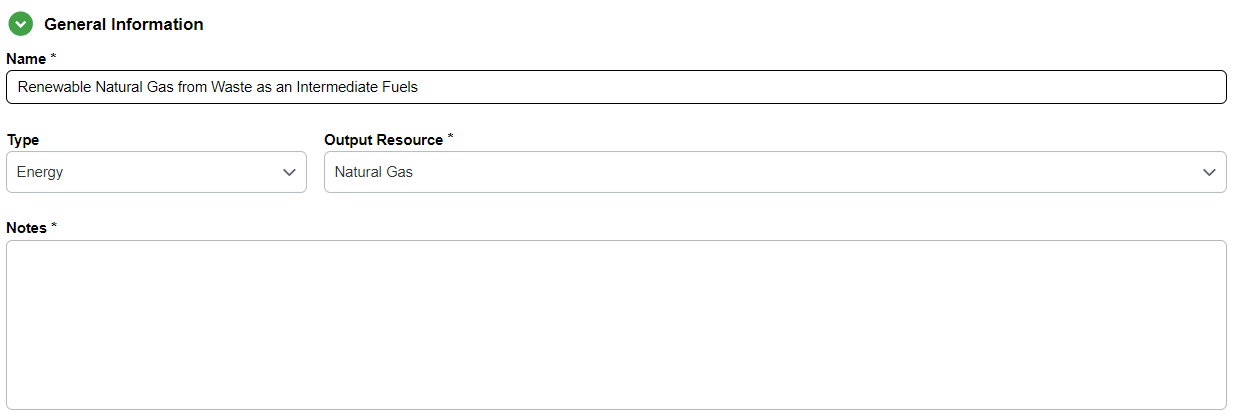
The General Information tab for the Pathway Mixes allows the user to directly edit the name and notes of the mix, as well as the relative shares of the pathway mix.
Top Section
In the top section of the general information tab, the user may specify:
- Name
- Notes
- Output resource
- Type of the mix
Mix Type
The Type of the mix is defined by the output resource:
- If an output resource can be expressed as energy, volume, or mass, the mix can be as well
- If a resource can only be energy, then the mix can only be an energy mix as well
Mix Composition
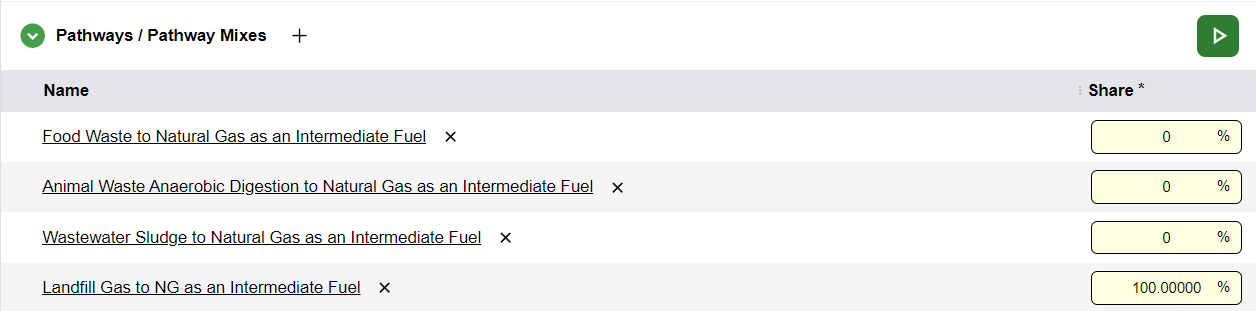
To edit the mix composition:
- Click the
+icon that appears when hovering over the Pathways / Pathway Mixes subsection title - A row will appear in the table below for the user to choose a relevant mix or pathway to add to the mix composition
Compatible Sources Only
Only pathways and pathway mixes that output the same output resource as the current mix (or a compatible source) may be chosen.
- Set the share percentage for that entry item
Blending and Compatibility
Mixes can also be employed to create blends of resources. If two resources are explicitly marked as "Compatible" within the database, they can be combined in a mix.
Warning
While the software supports blending within a Mix, it is generally discouraged. To maintain higher modeling fidelity, it is recommended to perform blending operations within a Stationary Process instead
Calculating Results
When the mix is fully defined:
- Click the green and white arrow button to calculate and display the results for the mix
- Or click on the Results tab to calculate and display the results in the same fashion
Results
The results tab for the pathway mixes functions similarly to the Pathways results section.
However, the pathway mixes results are broken down by individual mix share rather than individual processes in a pathway.
Info
For information on how to navigate and use the results, please view the results section of the pathway editor.