Operational Modes Editor
Overview
In PyGREET, a vehicle’s performance and environmental impact are determined by its Operational Modes. A mode represents a specific configuration of powerplants and fuels active during vehicle operation. While a conventional internal combustion engine vehicle (ICEV) typically operates in a single mode, advanced drivetrains like Plug-in Hybrid Electric Vehicles (PHEVs) utilize multiple modes, such as "Charge-Depleting" (electric) and "Charge-Sustaining" (hybrid/gasoline).
The Operational Modes Editor is the dedicated interface for defining these configurations. A mode consists a mode type, and one or more powerplants, which contain the fuel used by a powerplant and the tailpipe emissions. Operational Modes can then be added to vehicles in The Vehicle Editor
An Operational Mode consists of:
- A name
- An operational mode type (chosen from a dropdown)
- One or more powerplants
The Operational Modes editor consists of two bottom tabs:
- Operational Mode
- Usage Tab
The functionality of the usage tab is explained within the relevant section within the Tab Navigation Section.
Operational Mode Tab
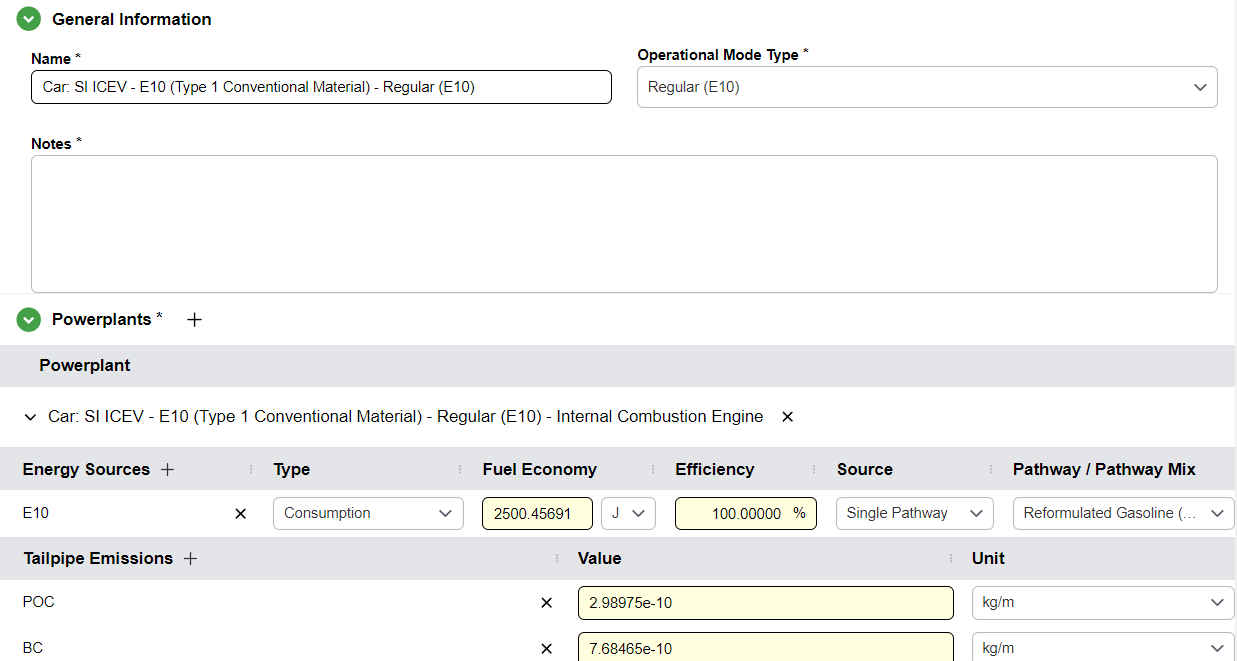
The Operational Mode Tab contains the information about the operational mode. It consists of two sections: The General Information section, which contains the name of the mode and its type, and the powerplants table.
General Information
Each operational mode has a General Information section containing:
- Name: A user-defined label for the operational mode
- Operational Mode Type: Selected from a dropdown, this categorizes the mode of operation (e.g., CD Mode, CS Mode, conventional operation)
Regular or Charge Sustaining (CS)
In this mode, the vehicle is using energy from the tank only and any secondary means of energy storage is not depleted. In a hybrid vehicle, some of the energy from the battery may be used to assist the petrol engine; however, this is a small amount of energy compared to the large batteries used in PHEVs.
Charge Depletion (CD)
The charge depletion mode is used by PHEVs. This mode assumes that electricity from a battery is used as a primary source of energy.
Powerplant
Introduced in GREET.net 2015, the Powerplant (or Powertrain) concept allows for a modular representation of vehicle technology, dissociating energy consumption from emission profiles. A powerplant represents a specific power source, such as an internal combustion engine, fuel cell, electric motor, or gas turbine, operating within a given Operational Mode. This architecture enables the modeling of hypothetical vehicles and complex systems like hybrids, where multiple powerplants may drive a vehicle simultaneously or sequentially. By isolating the power source, the software can precisely measure energy and emission impacts on a Well-to-Wheels (WTW) basis
Each operational mode contains one or more powerplants that define how energy is consumed and what emissions are produced during that mode of operation. Powerplants consist of:
- Energy sources
- Tailpipe emissions
Energy Sources
Energy sources define the main fuels or energy carriers consumed by the powerplant.
Adding Energy Sources:
- Click the
+icon next to the Energy Sources label in the table - Search for and select the desired resource flow
- Each energy source is modeled with:
- Total energy consumption per unit of distance traveled
- Efficiency of the powerplant when using this energy source
- Source

Charging and Refueling Efficiency
It is an abstract value representing the ratio of fuel or energy successfully transferred from the dispensing point (the pump or the wall) to the vehicle's storage system (the tank or the battery). This parameter accounts for the energy losses inherent in the final stage of the delivery chain. For electric vehicles, this specifically incorporates the charger losses occurring between the electrical outlet and the battery terminals.
Source
Each of the energy sources must be coming from a pathway or a mix, this is used to calculate the upstream results associated with the vehicle energy consumption.
Energy Consumption Type
- Consumption: This represents the amount of energy or fuel volume required for a vehicle to travel a specific distance (e.g., L/100 km or kWh/mile)
- MPG-Gasoline: This is the Miles per Gallon Gasoline Equivalent. It represents the distance a vehicle can travel using an amount of alternative fuel (hydrogen, or natural gas) that contains the same energy as one gallon of gasoline.
- MPG-Diesel: This is the Miles per Gallon Diesel Equivalent. Because diesel has a higher energy density than gasoline, this metric is used to compare alternative fuels against a diesel benchmark.
"Output of a Previous Process
If an energy source has a source type of "Output of a previous process," the operational mode is considered non-standard. Any vehicles using an operational mode must be modeled in the Pathway Editor to generate results.
Tailpipe Emissions
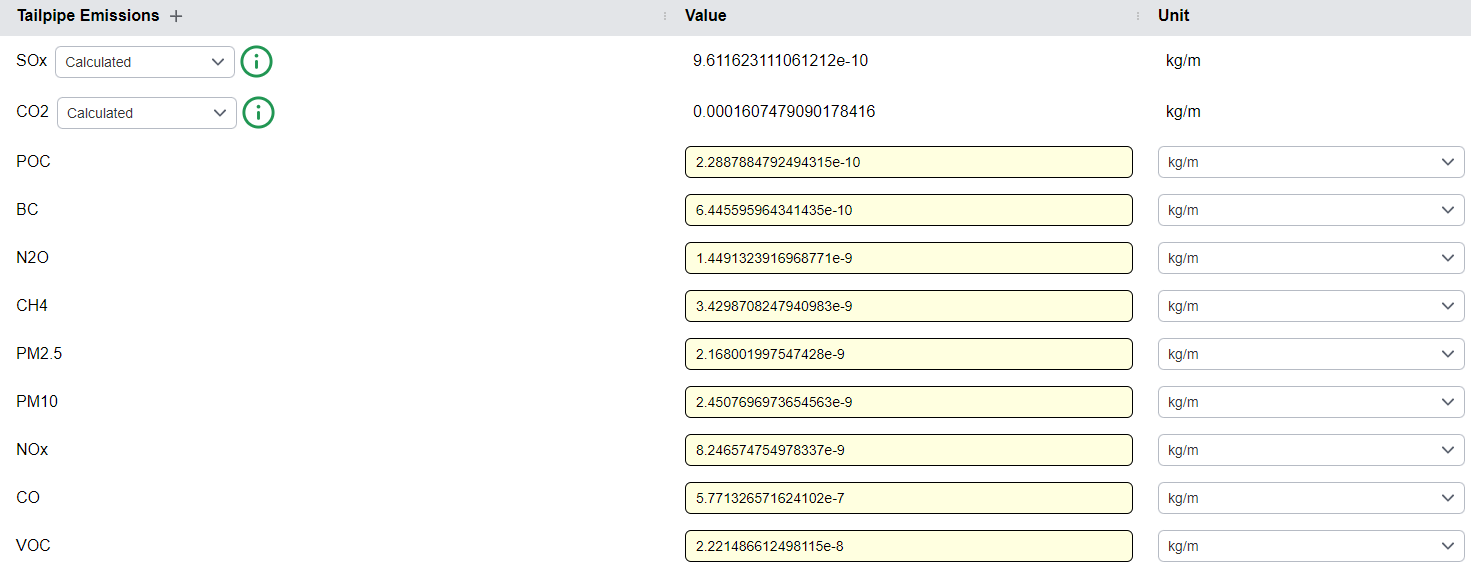
Tailpipe emissions represent the exhaust emissions produced by operating the vehicle under a given operational mode. These are direct emissions released during fuel combustion or energy use.
Adding Tailpipe Emissions:
- Click the
+icon under the Tailpipe Emissions section - Similar to the Conversion Editor, SOx and CO2 emissions can either be entered manually or calculated automatically based on fuel properties
- Additional tailpipe emissions can be added by clicking the
+icon next to the Tailpipe Emissions label
Info
Tailpipe emissions are expressed per unit of distance traveled and contribute to the Vehicle Operation columns in the Results table.