Transportation Mode Editor
Overview
The Transportation Mode Editor (TME) defines the type of vehicle or infrastructure used to transport goods. Transportation Modes are used for Transportation Steps in the TPE; a step must use a specific mode.
There are 7 categories of transportation mode, each with slightly different parameters:
- Tankers
- Barges
- Trucks
- Pipelines
- Rails
- MagicMove
- Generic modes
The transportation mode editor always has two bottom tabs:
- General Information Tab
- Usage Tab
The functionality of the usage tab is explained within the relevant section within the Tab Navigation Section.
Tanker and Barge
The Tanker and Barge transportation modes have the same three sections of data to enter, along with the name and notes.
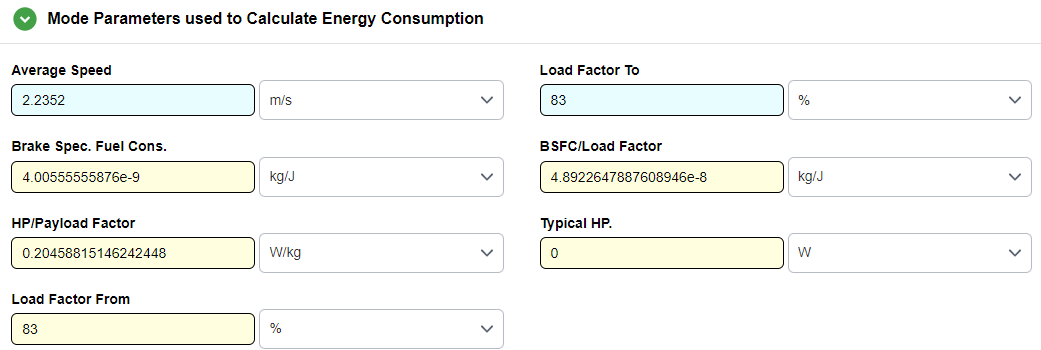
Mode Parameters used to Calculate Energy Consumption
These parameters are entered to automatically calculate the energy consumption of the tanker. All parameters are input by the user and can be formulas or time series data.
Specific Parameters for Tanker and Barge
- Average Speed: This represents the average speed from the destination to the originating location.
- Load Factor to: The load factor to represents the throttle or the percentage of power used over power installed from the originating location to the destination.
- Load Factor From: The load factor from represents the throttle or the percentage of power used over power installed from the destination location back to the originating location.
- Brake Spec. Fuel Cons. (or Typical fuel consumption), Typical HP, HP/Payload factor: These three parameters are used to estimate the energy intensity of the barge or ocean tanker
Payload and Energy Consumption Table
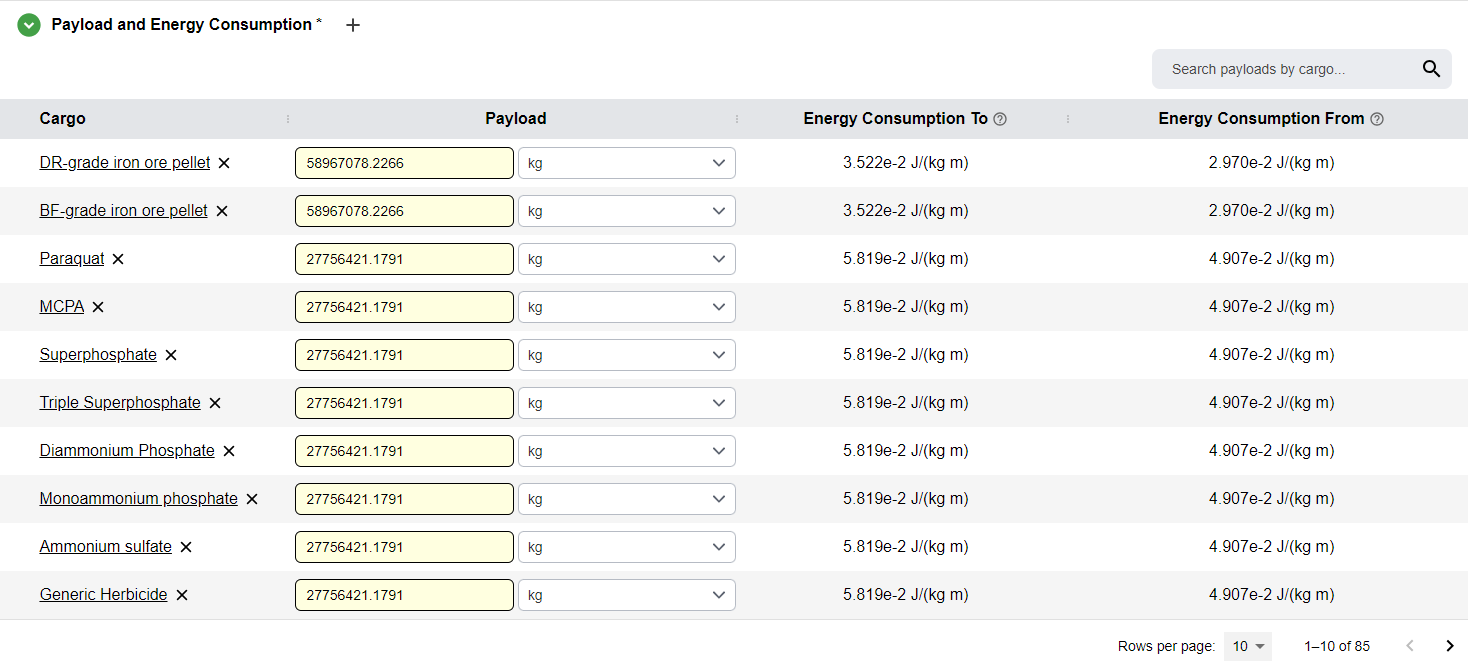
This section identifies the payload capacities for Tanker and Barge transportation models, which are used in conjunction with the parameters defined in the previous section to determine the total energy consumption for these modes. By establishing the specific mass or volume of cargo these vessels can carry, the model can accurately calculate the energy intensity.
Adding Payloads
- Click the
+icon that appears when hovering over the Payload and Energy Consumption subsection title - Cargos consist of:
- Flow chosen in the Cargo column
- Payload numeric input
- When the payload is defined, the energy consumption to and from are automatically calculated and displayed
Payload
Payload is the maximum amount of goods a vessel, truck, barge or other transportation mode can carry while remaining within safe operational or legal weight limits.
Fuel Groups Table
The Fuel Groups table is the same for all transportation modes. The mode’s fuel groups are designed to help select different fuel blends to run the different modes. Each transportation mode energy is provided using some fuel associated with some upstream. In this way, one can store different configurations of fuel groups for a mode.
Each fuel group has:
- One or more fuels
- Share of the fuel group
- Conversion to use for each direction of travel
Adding Fuel Groups
- New fuel groups: Click the
+icon that appears when hovering over the Fuel Groups subsection title - New fuels: Click the
+icon that appears when hovering over the fuel group title (e.g., Default)

Truck
The Truck transportation mode utilizes a structural framework identical to the Barge and Tanker models, ensuring consistency across the software interface. However, a key distinction exists within the Mode Parameters used to Calculate Energy Consumption section: users are required to define the specific fuel economy of the vehicle for each distinct leg of the transportation process.

Specific Parameters for Truck
- Fuel Economy To: Fuel economy from origin to destination (assumed to be loaded or Full)
- Fuel Economy From: Fuel economy from destination back to origin (assumed to be unloaded or Empty)
Pipeline
The Pipeline Transportation mode has two sections:
- Energy Consumption
- Fuel Groups
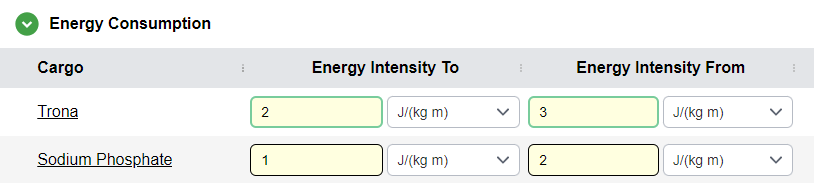
For pipelines, the energy consumption is not calculated; instead, it is defined as a value for liquids or solids and a few are defined for specific materials.
Energy Consumption Section
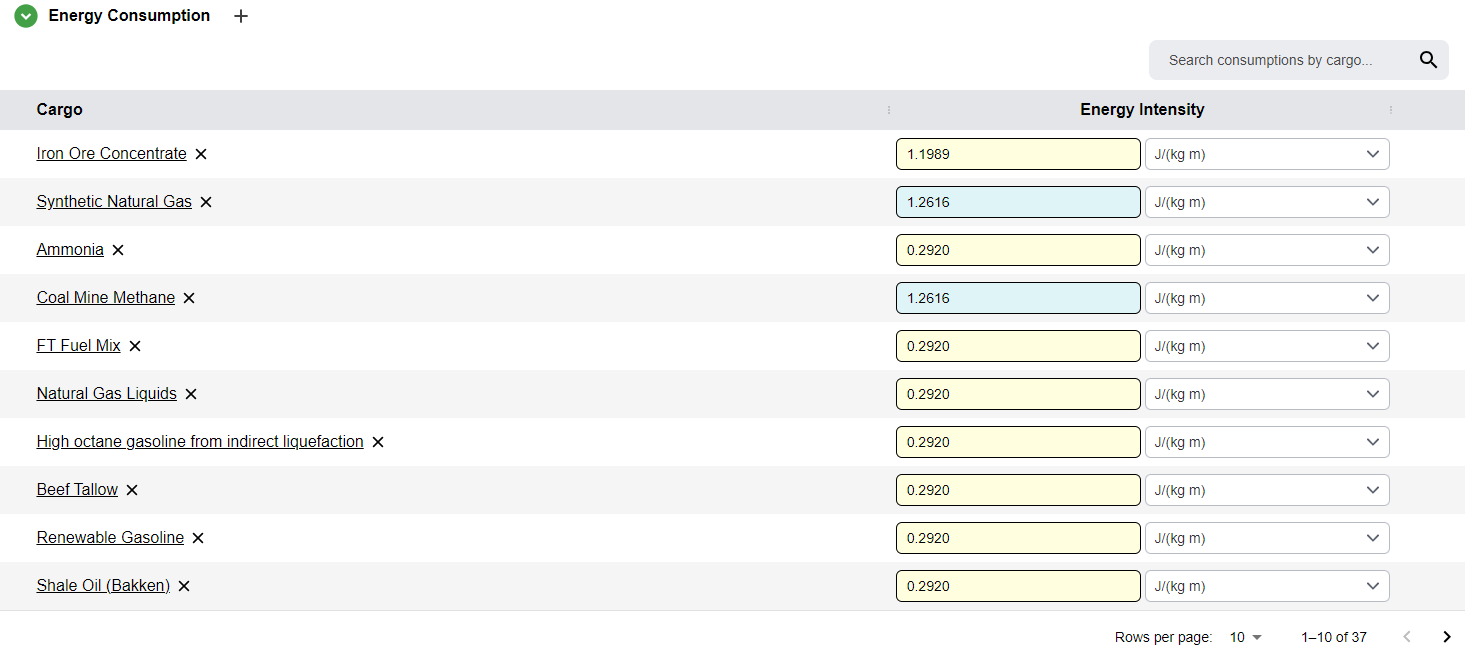
A table where the user enters the energy intensity for different cargos in the pipeline transportation mode.
Energy Intensity
Energy intensity is a physical metric that quantifies the amount of energy consumed to move a specific unit of payload over a specific distance
Adding Cargos
- Click the
+icon that appears when hovering over the Energy Consumption subsection title - The name of a cargo can be clicked on to open the flow editor for that cargo
Default Data
The default Pipeline transportation mode in the GREET dataset also has default data for resources that have a solid or liquid resource state for retrocompatibility with prior GREET data. These can be modified here, and a note explaining this appears when hovering over them in the mode.
The Fuel Groups section for Pipeline is the same as the above transportation modes. However, the Conversion From is automatically filled out as N/A, as there is no backhaul for pipeline transportation.
Rail
The Rail Transportation mode has two sections:
- Mode Parameters used to Calculate Energy Consumption
- Fuel Groups
Mode Parameters Section
Contains two parameters for the user to define:
- Average speed
- Energy intensity of the mode
The Fuel Groups section is the same as the Pipeline section above.

Note
The same energy intensity is used for any resource being transported and for any fuel used by the train.
Magic Move
The Magic Move Transportation mode serves as a dummy connector for a transportation process. There are no inputs besides the name and notes of the mode, as it is used to represent a step in a transportation process that does not produce any impacts or emissions.
Note
Including a Magic Move in the transportation canvas is a matter of informational clarity. By explicitly defining a mass share for a Magic Move, the user demonstrates that a specific portion of the cargo has zero environmental impact. This prevents the confusion that arises from simply omitting a block, which can leave a "missing" mass balance and make it unclear whether certain logistics steps were overlooked or intentionally excluded.
Generic
The Generic transportation mode provides a flexible framework for creating reusable elements that can be integrated across multiple transportation processes. By allowing for custom parameter definitions, this mode enables advanced analysis that extends beyond the fixed constraints of the standard transportation models-such as trucks, barges, or tankers-traditionally defined in GREET.
The Generic Transportation mode has two sections:
- Energy Consumption
- Fuel Groups
Energy Consumption Table
The Energy Consumption Table for Generic Transportation Modes is the same as the Pipeline Energy Consumption Table, however it also allows for backhaul, unlike Pipelines.
The Fuel Groups section is the same as Tanker and Barge Transportation modes.