Impact Category Editor
Overview
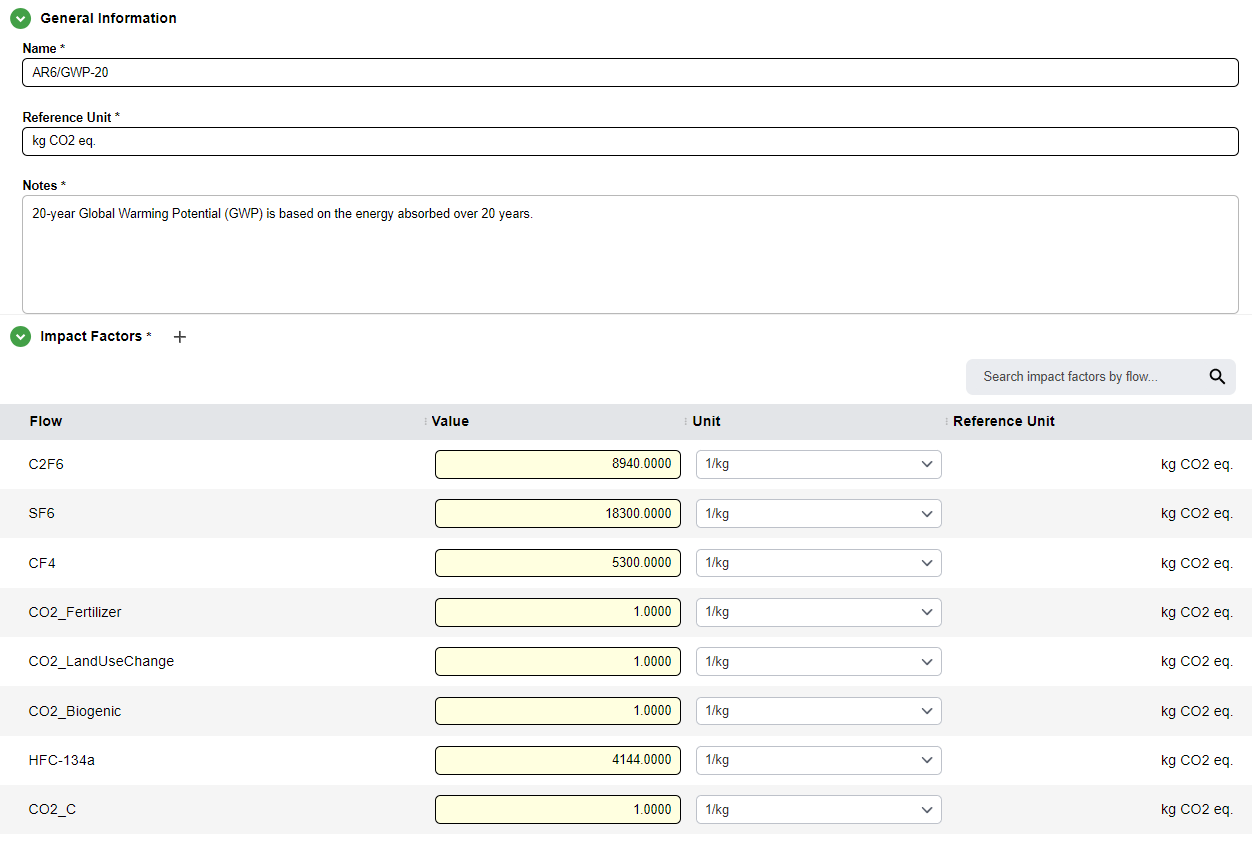
The Impact Category Editor allows users to add or modify Impact Categories, which contain a table of Impact Factors. These factors are flows associated with an impact value. These impacts are then used to calculate impacts during results generation. Impact Categories are created and then selected in the Impact Method Editor. The factors within each chosen Impact Category are then used when calculating reuslts
The Impact Category Editor has two tabs, the General Information Tab and Usage Tab.
The functionality of the usage tab is explained within the relevant section within the Tab Navigation Section.
General Information
The General Information section in the Impact Category Editor contains the name, notes, and Reference Unit of the Impact Category, which can be directly edited by the user.
Note
The reference unit for an Impact Category is consistent across all impact factors, and is typed in, not chosen from the list of units similar to other unit selections.
Impact Factors Table
The Impact Factors table contains the Impact Factors chosen within an Impact Category. These are the impacts that will be run by calculations when an Impact Category is run through an Impact Method.
Adding Factors
- Click the
+icon that appears when hovering over the Impact Factors subsection header - Factors added to the table have a name, value, and unit. They also show the reference unit of the Impact Category
The value and unit of an Impact Factor can be edited similar to other tables.